From ZBDongle-P to SLZB-MR4U: a painless Zigbee migration
/ 6 min read
Table of Contents
After running a Zigbee network of 100+ devices on a Sonoff ZBDongle-P for years, I finally upgraded to the SMLIGHT SLZB-MR4U — a dual-radio coordinator with PoE support. Here’s how the migration went, what I learned, and the gotchas you should know about.
Why Upgrade?
The ZBDongle-P served me well. It’s a solid CC2652P-based coordinator that handles a large Zigbee mesh without complaints. But it has limitations: USB-only connectivity means it’s tethered to whatever host runs Zigbee2MQTT, and it’s a single-protocol device. With IKEA and other manufacturers moving to Thread/Matter, I wanted a future-proof setup without running separate dongles.
The SLZB-MR4U ticked every box. It has two dedicated radio chips — a CC2674P10 (Texas Instruments) for Zigbee and an EFR32MG26 (Silicon Labs) for Thread — plus an ESP32-S3 that handles the network stack, web interface, and coordination. All accessible over Ethernet with PoE support, so I can place it wherever makes sense for coverage instead of wherever my server rack happens to be.
My Setup
My infrastructure runs on Proxmox with a clear separation of concerns. Home Assistant runs as a VM, while Zigbee2MQTT and MQTT each run in their own dedicated LXC containers. The MR4U connects to my UniFi-managed IoT VLAN over PoE, and Z2M talks to it over TCP. This architecture means I can update, restart, or migrate individual services without taking down the whole smart home.
Choosing the Right Coordinator
SMLIGHT’s product range is extensive — almost confusingly so. Here’s the decision tree I followed:
The SLZB-06 range has a single radio chip, meaning you choose Zigbee or Thread. The MR range has two chips for simultaneous operation. Within the MR range, the MR3U mixes a TI Zigbee chip with a SiLabs Thread chip, the MR4U pairs TI with the newer MG26, and the MR5U runs dual SiLabs MG24 chips.
I went with the MR4U because the Zigbee side (CC2674P10) runs the same TI Z-Stack firmware as my ZBDongle-P, making migration as seamless as possible. The Thread side gets the EFR32MG26 — the beefiest SiLabs chip available with 512KB RAM and 4MB flash — ready for when I add Thread devices.
I bought it from HAshop.nl for fast Dutch delivery and local returns.
Firmware Preparation
Before migrating, I checked the MR4U’s firmware through its web interface. The device has three independent firmware components:
- SLZB-OS: The ESP32 operating system that runs the web interface and network stack
- CC2674P10: The Zigbee radio firmware (Z-Stack coordinator)
- EFR32MG26: The Thread radio firmware (Matter-over-Thread RCP)
A word of caution: both the Zigbee and Thread radios offered “Dev firmware” options alongside stable releases. I stuck with stable releases only — running development firmware on a coordinator that manages 100+ devices is not worth the risk. The CC2674P10 shipped with coordinator firmware 20240602 and I left it as-is. For the EFR32MG26, I flashed the stable Matter-over-Thread 20250703 factory firmware to have it ready for future use. (“Future use” arrived sooner than expected — see Getting Thread/Matter Working on Proxmox for the commissioning saga that followed, including the gotchas of running the OpenThread Border Router against this radio over TCP rather than USB.)
The Migration
The actual migration was surprisingly straightforward. Since both the ZBDongle-P and the MR4U’s CC2674P10 run TI Z-Stack, this is a same-family swap — the simplest migration path possible.
Step 1: Flash the IEEE Address
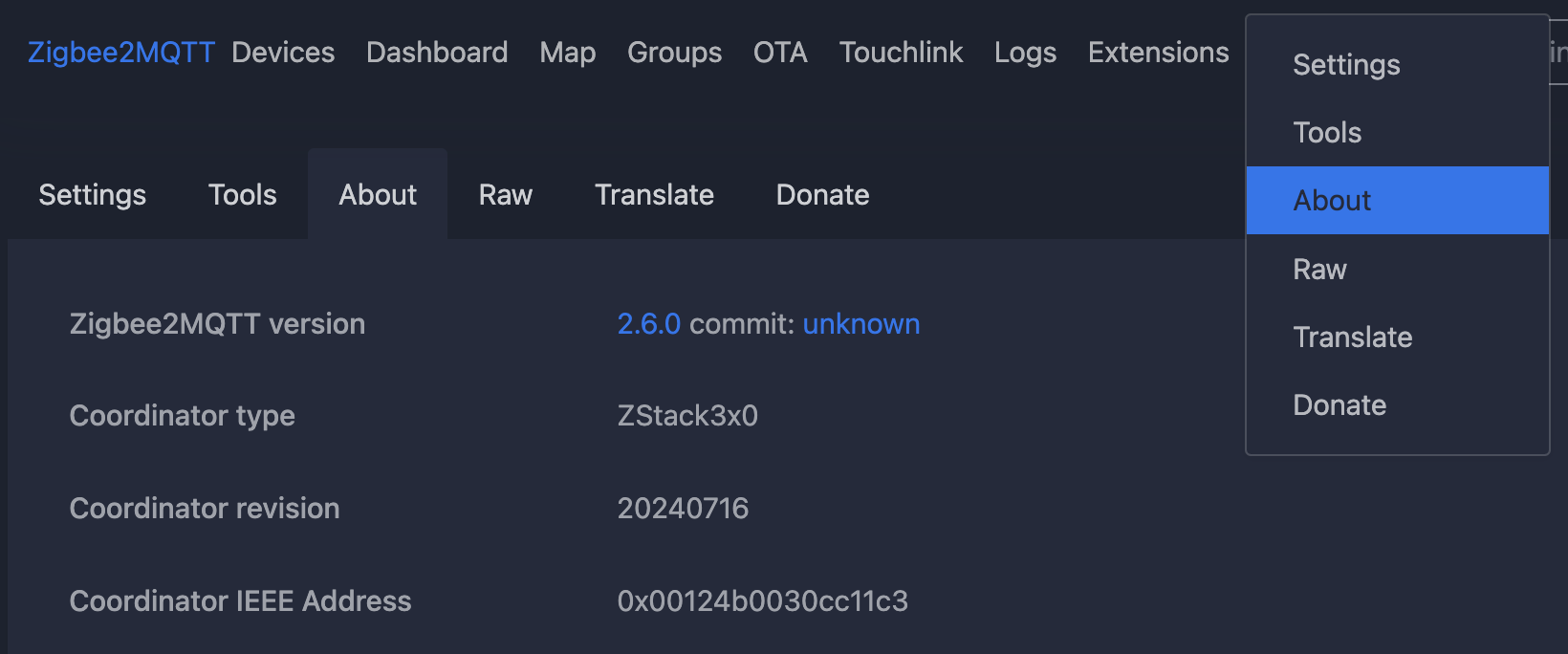
This is the critical step that makes the entire migration seamless. In Zigbee2MQTT, I copied my coordinator’s IEEE address from Settings → About.
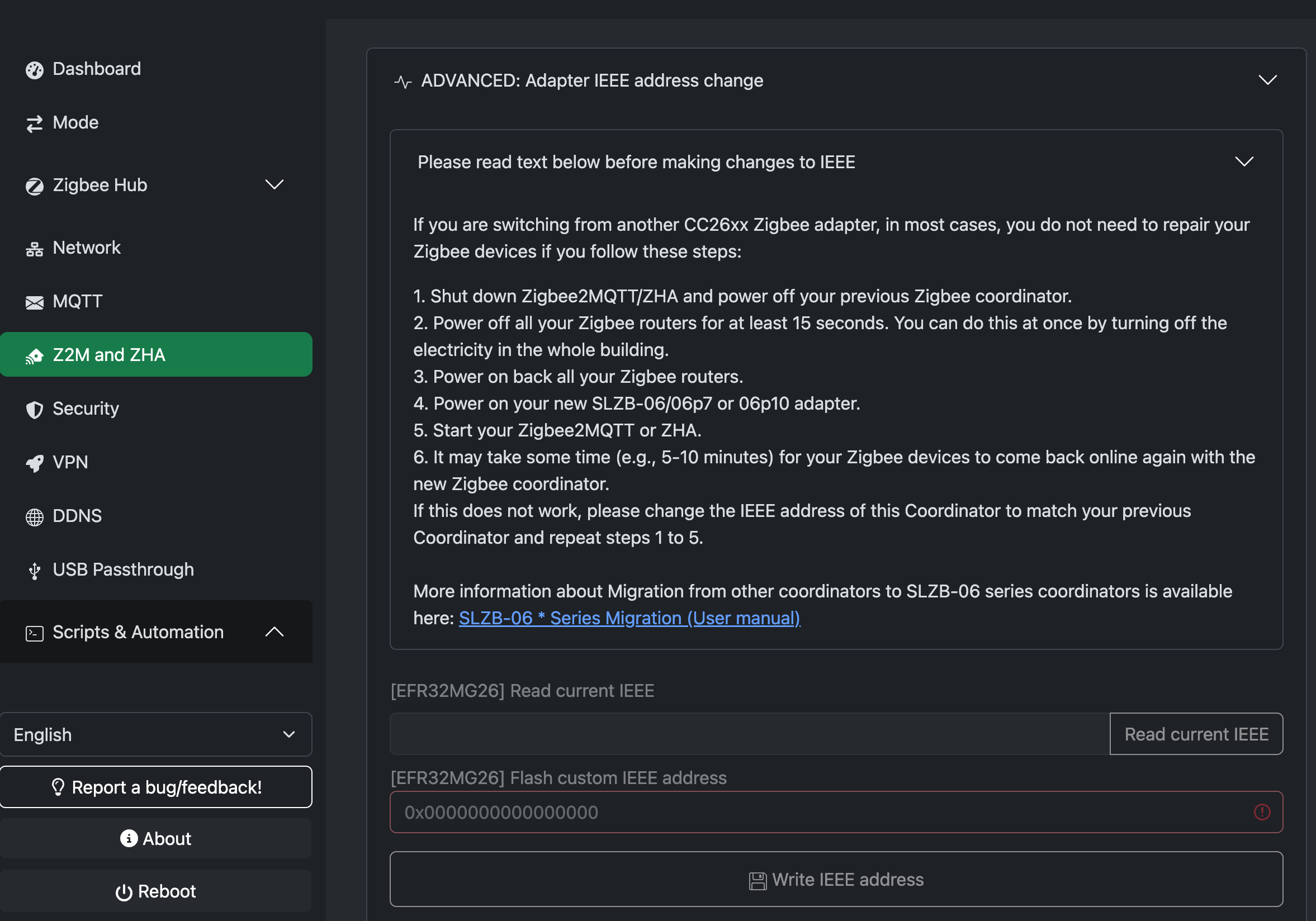
Then in the MR4U’s web interface, I flashed this address onto the CC2674P10 chip. This makes all existing devices think they’re still talking to the same coordinator — no re-pairing needed.
Step 2: Stop Z2M and Update the Config
I SSH’d into the Z2M LXC container and stopped the service:
systemctl stop zigbee2mqttThen edited the configuration:
nano /opt/zigbee2mqtt/data/configuration.yamlThe old config pointed to the USB device path:
serial: port: >- /dev/serial/by-id/usb-ITead_Sonoff_Zigbee_3.0_USB_Dongle_Plus_... adapter: zstack baudrate: 115200 rtscts: false disable_led: falseThe new config points to the MR4U over TCP:
serial: port: tcp://192.168.100.247:7638 baudrate: 115200 adapter: zstackadvanced: transmit_power: 20A few things to note:
- Port 7638 is Radio 2 (CC2674P10, Zigbee). Radio 1 (EFR32MG26, Thread) uses port 6638. Don’t mix them up.
rtsctsanddisable_ledare USB-specific settings and can be removed.transmit_power: 20sets the radio to maximum +20dBm output — a significant upgrade over the ZBDongle-P.adapter: zstackstays the same since both coordinators are TI chips.
Pro tip: the MR4U’s web interface has a “Z2M and ZHA Config generator” page that produces the exact config snippet you need — including the correct IP, port, baudrate, and adapter type. I recommend using it instead of typing manually.
Step 3: Start Z2M
systemctl start zigbee2mqttWatching the logs with journalctl -u zigbee2mqtt -f, I saw the TCP socket connect immediately:
zh:zstack:znp: Opening TCP socket with 192.168.100.247:7638zh:zstack:znp: Socket connectedzh:zstack:znp: Socket readyDevices started checking in within minutes. A few battery-powered sensors (door contacts, motion sensors) showed “Failed to configure” errors — this is completely normal. They were asleep and hadn’t reconnected yet. Triggering them physically (opening the door, waving at the sensor) forced an immediate reconnect. Within a few hours, every device was back online.
Bonus: Clean Up USB Passthrough
Since Z2M now connects over TCP instead of USB, I no longer need the USB device passthrough from Proxmox into the Z2M LXC. I removed the USB device mapping from /etc/pve/lxc/<id>.conf, making the container fully portable across Proxmox nodes.
Physical Placement
One of the main advantages of a PoE coordinator is placement flexibility. With the ZBDongle-P, the coordinator was tethered to my server rack via USB. With the MR4U, it just needs an Ethernet cable to a PoE switch port.
I kept mine in the same spot as the old dongle — hanging outside the server rack on the attic. The rack has a glass door that’s transparent to 2.4GHz, but the metal sides would attenuate the signal. Keeping it outside and away from the UniFi switch (to avoid 2.4GHz interference) was the pragmatic choice.
For my 100+ device mesh with plenty of mains-powered routers, the coordinator placement is less critical — the mesh handles routing. But the +20dBm TX power on the MR4U is noticeably stronger than the ZBDongle-P, and I saw LQI improvements across several devices after the migration.
Final Thoughts
The Zigbee migration was genuinely painless — 20 minutes from start to finish, zero devices needed re-pairing. The key is the IEEE address flash: once you copy your old coordinator’s identity onto the new one, the entire mesh just reconnects as if nothing changed.
If you’re on a TI-based coordinator (ZBDongle-P, ZBDongle-E, or similar CC2652-based devices), the MR4U is a smooth upgrade path. The same Z-Stack firmware family means no adapter changes, no database rebuilds, no re-pairing marathon.
The MR4U itself is excellent hardware — solid build quality, responsive web interface, dual-chip architecture that delivers on the simultaneous-protocol promise, and active firmware development from SMLIGHT. At the price point (around €70 from Dutch retailers), it’s hard to beat for anyone running a serious Zigbee network who wants to be ready for Thread when the time comes.